- Look at everything with a view of the bed, shower, toilet or changing area.
- Turn the lights off and sweep a flashlight slowly: a camera lens throws back a small, sharp glint.
- Point your phone's front camera at suspicious objects in the dark to spot infrared lights.
- Scan the Wi-Fi signals around you for camera hotspots.
- On a network you can join, check the connected devices for camera makers.
- Scan Bluetooth for trackers and unfamiliar devices.
Most rooms are fine. But hidden cameras have been found in bathroom electrical outlets, in an Airbnb bathroom, and inside smoke detectors and chargers. A check takes a few minutes, and it is the same routine whether you are in a rental, a hotel or a new apartment.
1. Look where cameras hide
Before you unpack, look at every object with a clear view of the bed, the shower, the toilet or anywhere you would change. If it can see you, look back at it.
- Smoke and carbon monoxide detectors. Look for a small dark circle that is not the status light.
- Outlets and USB chargers. A real charger has no pinhole on the front. A real outlet has no lens between the slots.
- Alarm clocks and digital photo frames. The lens is often just below the display.
- Vents, air purifiers, tissue boxes and decorative books. Anything with a hole or slot facing the bed.
- Mirrors. Touch the glass with a fingertip. A gap between your finger and its reflection is normal; no gap can mean a two-way mirror.
- Screws and small fixtures. A screw that does not match its neighbors deserves a closer look.
2. Sweep a flashlight for lens reflections
Turn off the room lights and switch on your phone flashlight. Hold it near your eye and sweep the beam slowly across walls, ceilings and objects. A camera lens is curved glass: it throws back a small, sharp, bright dot that stays put as you move a little. Wood and fabric do not do that.
This works on most pinhole cameras. It does not see a lens hidden behind fabric, mesh or tinted film, which is what the next steps are for.
3. Look for infrared lights with your phone camera
Many hidden cameras have infrared lights for night recording. Your eyes cannot see them, but a phone camera often can. In the dark, open your camera, switch to the front camera and point it at smoke detectors, clocks and vents. A small purple or white light on the screen that you cannot see in the room is worth a closer look.
Use the front camera: many phones filter infrared on the rear camera. And a camera recording without night vision shows no light at all, so a clean result here proves nothing on its own.
4. Scan for camera Wi-Fi signals
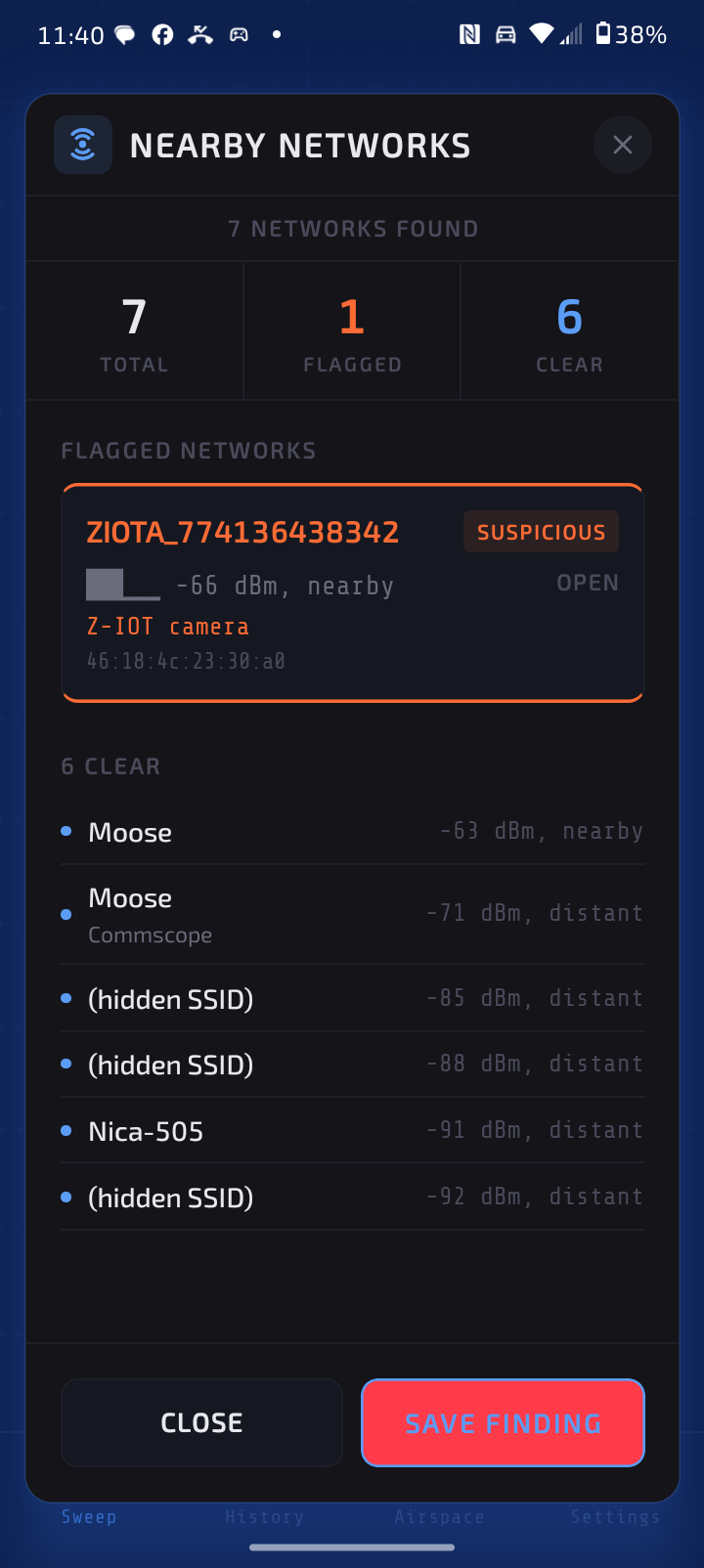
Many cheap hidden cameras broadcast their own Wi-Fi network, especially before they are set up or after they lose their connection. The network names follow patterns like IPCAM_, V380_, MIPC_, LOOKCAM_ or a brand name followed by a serial number. Your phone can read these names without joining anything, so this works in hotels, rentals and changing rooms alike.
Veilbreaker's Nearby Networks scan reads every network around you and flags the ones that match camera brands and the setup apps cheap cameras use. It also notes the chip makers common in camera modules when a network is hidden or has a factory-style name.
5. Check the devices on the Wi-Fi you are using
A camera that has been set up joins the Wi-Fi like any smart TV or speaker. If you can join the network, Veilbreaker's Wi-Fi scan lists the connected devices, names their manufacturers from a database of 39,000 registered makers, and asks the network for cameras using the ONVIF, UPnP and mDNS discovery that cameras answer to. It also checks for open video streaming ports. A device made by Hikvision or Dahua that answers on the video streaming port is very likely a camera.
6. Scan Bluetooth
Some hidden devices are trackers rather than cameras: AirTags, Samsung SmartTags and Tile tags slipped into a bag or car. Some cameras also broadcast over Bluetooth while they are being set up. In our test, the ZIOTA camera showed up in Veilbreaker's Bluetooth scan as an unknown device under its own name, and the locator beeps faster as you walk toward a device like that.
For trackers specifically, see how to tell if an AirTag is tracking you on Android.
7. Use the electromagnetic field reading as a hint
Powered electronics give off a small electromagnetic (EM) field, and your phone's magnetometer can measure it. Veilbreaker's EM Field scan sets a baseline for the room and shows spikes near hidden electronics. Speakers, motors and metal cause spikes too, so treat it as a hint that tells you where to look, not as proof.
What a phone cannot find
Be honest with yourself about the limits. A battery camera that only records to a memory card, has its Wi-Fi off and has no night-vision lights sends no signal at all. No phone app can detect it. Only the physical check and the flashlight sweep will. That is why the routine starts with your eyes and ends with the scans, not the other way around.
Checking an Airbnb or hotel room
- Airbnb. Airbnb has banned all indoor cameras in listings since April 30, 2024. A camera inside the space is a reason to report the listing through Airbnb's safety line.
- Hotels. Start with the Wi-Fi signal scan as you walk in, then the bathroom and the area facing the bed. The room network scan rarely works on hotel Wi-Fi.
- New apartments. Check before you move furniture in. Devices left by previous tenants are easier to spot in an empty room.
Every method in this guide, in one app.
Veilbreaker runs the Wi-Fi signal scan, the network scan, the Bluetooth scan, the EM Field reading and an 18-point physical checklist on your Android phone. 3 days free.
Start 3-Day Free TrialIf you find one
Do not unplug or move it. Photograph it where it is, with the room around it visible. If you use Veilbreaker, save a timestamped report. Leave the room, contact local police, and report it to the platform or hotel. Keep your booking confirmation, photos and report together. The full steps are in what to do if you find a hidden camera in your rental.
Checklist to save
- Look at everything with a view of the bed, shower, toilet or changing area.
- Lights off: flashlight sweep for lens reflections.
- Front camera in the dark: look for infrared lights.
- Scan the Wi-Fi signals around you.
- On a network you can join: scan the connected devices.
- Scan Bluetooth for trackers and unknown devices.
- Use the EM Field reading to decide where to look closer.
- If you find one: photograph, save a report, leave, call police, report it.
Frequently asked questions
Can my phone detect hidden cameras?
Yes, many of them. A phone can read the Wi-Fi networks cameras broadcast, list the devices on a network you join, see Bluetooth devices and spot infrared night-vision lights through its camera. It cannot detect a camera that records to a memory card with no wireless signal and no infrared light; for those you need the physical check.
Do hidden camera detector apps work?
The ones that read real signals do. Apps that only use the phone's magnetometer react to any electronics or metal and cannot tell a camera from a speaker. Look for an app that scans Wi-Fi networks, the devices on your network and Bluetooth. Our comparison of hidden camera detector apps for Android covers what each method can and cannot do.
How do I check for hidden cameras in a hotel room?
Scan the Wi-Fi signals as you walk in, then check the bathroom and everything facing the bed, sweep a flashlight with the lights off, and look for infrared lights with your front camera. Hotel Wi-Fi usually hides other guests' devices, so a scan of the hotel network itself tells you little.
How long does a check take?
A few minutes per room. The scans take under a minute each; the physical check takes the longest.
What do I do if I find one?
Do not unplug or move it. Photograph it in place, save a timestamped report if you use Veilbreaker, leave, contact police and report it to the platform. See what to do when you find a hidden camera.
Is it legal to scan a network I am a guest on?
Veilbreaker only reads what devices broadcast and what your own phone can see: network names, device addresses and the answers devices give to standard discovery requests. It does not read anyone's traffic, guess passwords or change the network.